


 +100宝石



产品功能
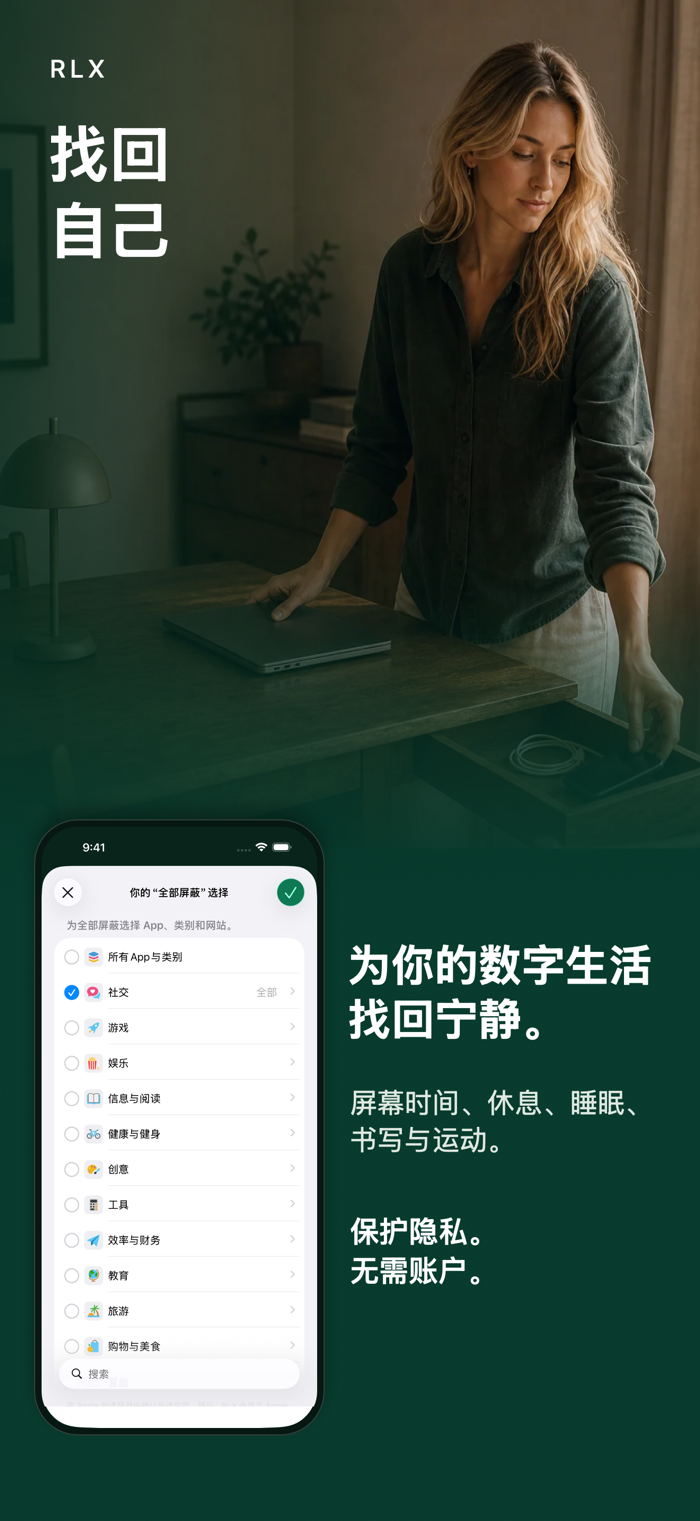
一款功能完整的屏幕时间、正念与数字健康 App。屏蔽 App,呼吸、写下想法,给自己片刻安静。无需账户,没有订阅或广告,隐私从设计之初就放在首位。
RLX 让你在 iPhone 上更平静、更清楚地使用 Apple 的“屏幕时间”。选出可以等等的内容,定下适合当天的界限,再按自己的意愿回来。没有账户、App 内购买、订阅或付费墙。
手机很有用,但不需要占满每一段空闲时间。
守护那些可以等等的内容
• 在 Apple 自带的“屏幕时间”选择器中选择 App、类别和网站。
• 现在开启守护、在指定时间开启,或设定每日限额。
• 查看当前生效的守护层级,并在一天有变化时调整选择。
• 对于一个 App,RLX 会显示 iOS 在本机呈现的真实系统名称和图标。对于较大或混合的选择,它会显示 Apple 按类型提供的有用本地标签,并用简洁的 +N 表示其余内容。
• 内容被屏蔽时,iOS 会显示屏蔽页面。普通守护有经过思考的退出方式;“锁定”只用于暂时且明确更严格的锁定承诺。
打开前停一停
选择想保持可用、但希望更有意识地打开的单个 App。打开时,RLX 会先留出短暂停顿。继续后,同一个 App 会继续可用 15 分钟。
融入你的 iPhone
可通过小组件、控制中心、快捷指令、操作按钮,或自行设置的 NFC 贴纸使用 RLX。小小的暂停提示可以出现在最有帮助的地方。NFC 贴纸只会触发所选操作,不会结束正在进行的“锁定承诺”,也不会绕过“儿童模式”。
按自己的方式更平静
休息、睡眠、日记和运动陪伴“屏幕时间”。需要时,可以选择一次简短练习、一段呼吸练习、一个想法或一次散步。没有付费方案或付费墙。
从一开始就重视隐私
• 没有账户、广告、分析或跟踪。
• 默认情况下,数据留在 iPhone 上。
• 可选择是否启用有限的 iCloud 副本;它会保留符合条件的设置、任务、儿童模式设置和进度,不属于设备备份。
• RLX 不会将你的数据发送到自己的服务器。
• RLX 使用 Apple 的“屏幕时间”来应用你的选择。
设备上的儿童模式
“儿童模式”在孩子的 iPhone 本机运行。家长通过本机家长 PIN 码和 Apple 的“家人共享”管理界限。RLX 没有服务器或远程监控。
清楚说明它能做什么
RLX 在 iPhone 上使用 Apple 的“屏幕时间”,只守护你在那里选择的 App、类别和网站。在 Safari 中,另一层可选设置只能限制成人网站(18+)或你明确开启的命名域名集合。它不是能屏蔽互联网上所有内容的通用开关。
分享「」体验,参与「」抽奖!
分享 1~3 张你对这个产品最满意的截图或效果图
分享「」体验,参与「」抽奖!
用你的故事点亮社区✨!你的真实体验,将会永久展示在 官方主页 📌,为其他朋友提供宝贵参考 💡。立即分享吧!🚀
请为产品评分
请选择问题回答,为大家提供宝贵参考
选择要回答的问题
温馨提示
你尚未上传产品截图。
上传截图可立即获得宝石积分奖励!
如果你赶时间,也可稍后修改评论,补上截图领取宝石。
温馨提醒
你尚未添加产品截图
⚠️ 不添加截图将降低抽奖权重

感谢参加,你已成功参加!
为了确保你能及时收到审核结果和领奖码通知

扫描二维码关注 Mergeek 公众号
在后台回复 「获奖通知」
完成上述操作,即可保障奖励发放成功










用户评价
立即分享产品体验
你的真实体验,为其他用户提供宝贵参考
💎 分享获得宝石
【分享体验 · 获得宝石 · 增加抽奖机会】
将你的产品体验分享给更多人,获得更多宝石奖励!
💎 宝石奖励
每当有用户点击你分享的体验链接并点赞"对我有用",你将获得:
🔗 如何分享
复制下方专属链接,分享到社交媒体、群聊或好友:
💡 小贴士
分享时可以添加你的个人推荐语,让更多人了解这款产品的优点!
示例分享文案:
"推荐一款我最近体验过的应用,界面设计很精美,功能也很实用。有兴趣的朋友可以看看我的详细体验评价~"
关注 Mergeek 公众号
领奖遇到问题?联系小门助手