Find the thin line between complex and simple to do lists
- Rank your to-do’s with priority by just swiping right and left on the task
- Got stand out tasks, bring them bold by typing bold right after the task
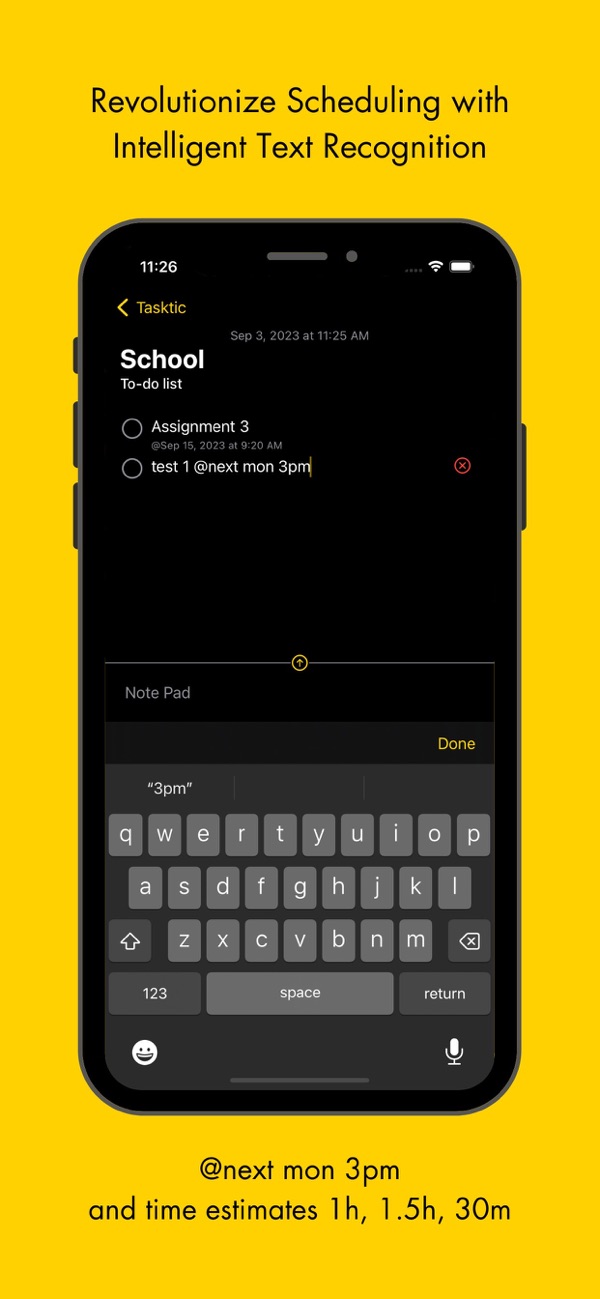
- Scheduling a task? maybe for @tmr 9:12AM or @next wed 3pm or @4th sep 5pm? That’s all you need to do.
- Got a quick task you don’t wanna procrastinate about? Type 1h 5m and see the time estimate appear reminding you every time that you indeed have time for your tasks.
- Ever commented out code before? //Archive your tasks by adding two slashes before.
- Got some repetitive tasks such as quiz 1 dup and oh wow quiz 2? Yes all you need to do is type dup after the task and it will automatically replicate your task. If your task had a number such as release v1.2 dup .... release v1.3, it will also increment that.
- Find yourself conquering your to-do list with keyboard shortcuts on Mac and get every bit of time back in your life.
- Stay tuned for exciting features and enhancements coming soon such as recurring tasks, subtasks, completion summaries for annoying scrum meetings, and more!
Created by Peter Khouly
Terms of Service https://tasktictodo.wordpress.com/2023/09/01/terms-of-service/


 +100宝石


 分享
分享











用户评价
立即分享产品体验
你的真实体验,为其他用户提供宝贵参考
💎 分享获得宝石
【分享体验 · 获得宝石 · 增加抽奖机会】
将你的产品体验分享给更多人,获得更多宝石奖励!
💎 宝石奖励
每当有用户点击你分享的体验链接并点赞"对我有用",你将获得:
🔗 如何分享
复制下方专属链接,分享到社交媒体、群聊或好友:
💡 小贴士
分享时可以添加你的个人推荐语,让更多人了解这款产品的优点!
示例分享文案:
"推荐一款我最近体验过的应用,界面设计很精美,功能也很实用。有兴趣的朋友可以看看我的详细体验评价~"
关注 Mergeek 公众号
领奖遇到问题?联系小门助手