

















加入 Mergeek 福利群
扫码添加小助手,精彩福利不错过!
若不方便扫码,请在 Mergeek 公众号,回复 群 即可加入
- 精品限免
- 早鸟优惠
- 众测送码
 GoodEar Pro
 4.9
4.9
Most ear-training apps are multiple-choice quizzes. You hear something, you tap a label. You get good at recognising labels.
Good Ear is built for the other half of the skill. You hear an interval, a chord or a melody — in real harmonic context, with the home chord ringing under it — and you play it back on a real piano keyboard. The same skill you use when you transcribe a solo, sing a part you've never seen, or hear a chord change for the first time.
WHO ACTUALLY USES GOOD EAR
– Self-taught musicians who've hit the plateau where their ears can't keep up with their playing
– College and conservatory students preparing for aural-skills, theory or entrance exams
– Jazz players, producers and session musicians who transcribe by ear
– Vocalists and instrumentalists learning to sing and play what they hear
– Teachers and educators looking for a structured aural-skills tool
THREE THINGS GOOD EAR DOES THAT MOST EAR TRAINERS DON'T
1. PLAY IT BACK ON A REAL KEYBOARD
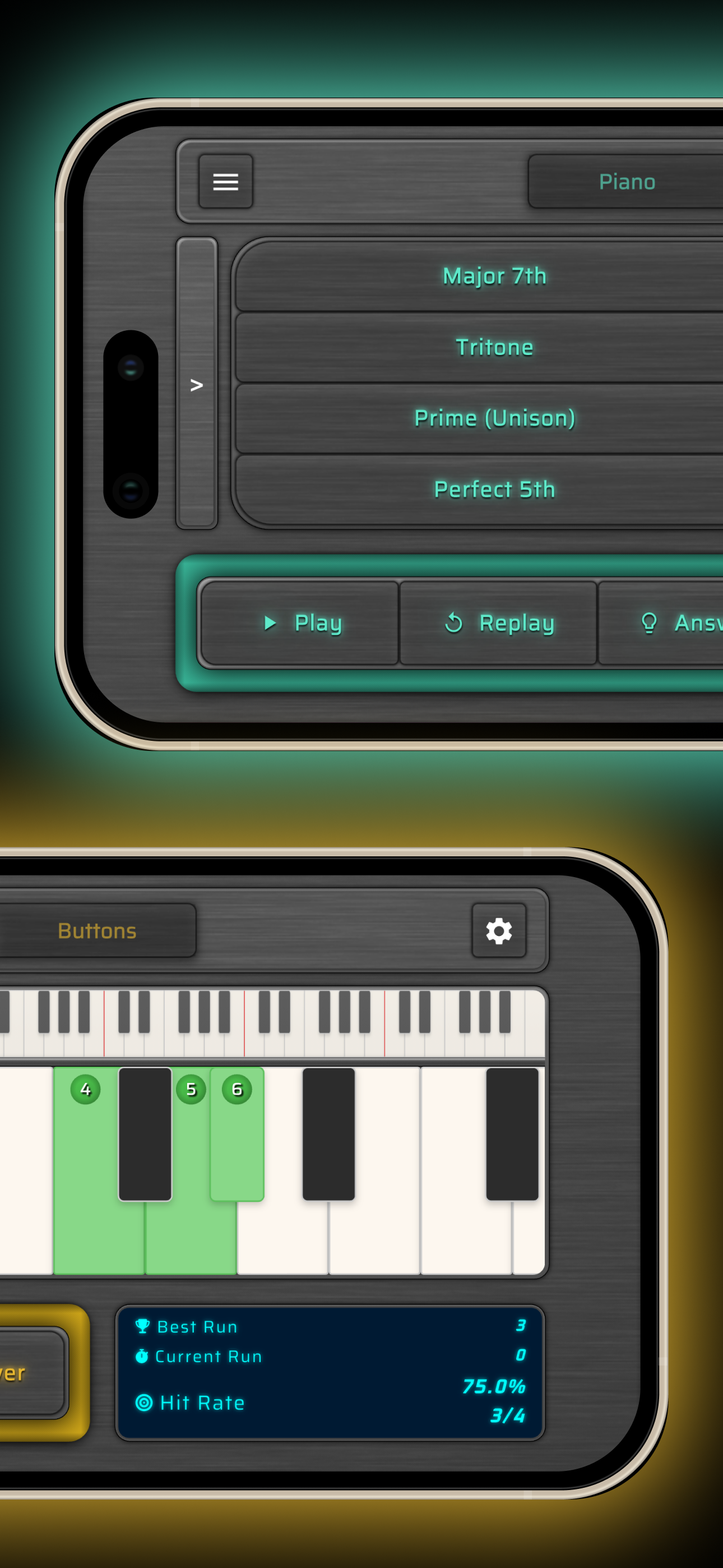
A scrollable 88-key piano with an overview bar, touch highlighting and multi-touch — the same input method a musician would use at an instrument. Multiple-choice mode is there too if you want fast recognition drills, and you can switch between them at any time. But Melodies mode is keyboard-input only, exactly like dictation in an aural-skills class.
2. HEAR IT IN REAL HARMONIC CONTEXT
Add a backing chord to interval and melody exercises. The three chord tones light up on the keyboard so you can see the tonal centre you are hearing — and tap them to explore the harmony without affecting your answer. Functional hearing, not abstract pitch detection.
3. DEPTH YOU WILL NOT OUTGROW
No "complete level 1 to unlock level 2." You pick exactly what you train, and the material goes deeper than most ear trainers ever bother:
– 24 intervals, from unison to compound 14ths
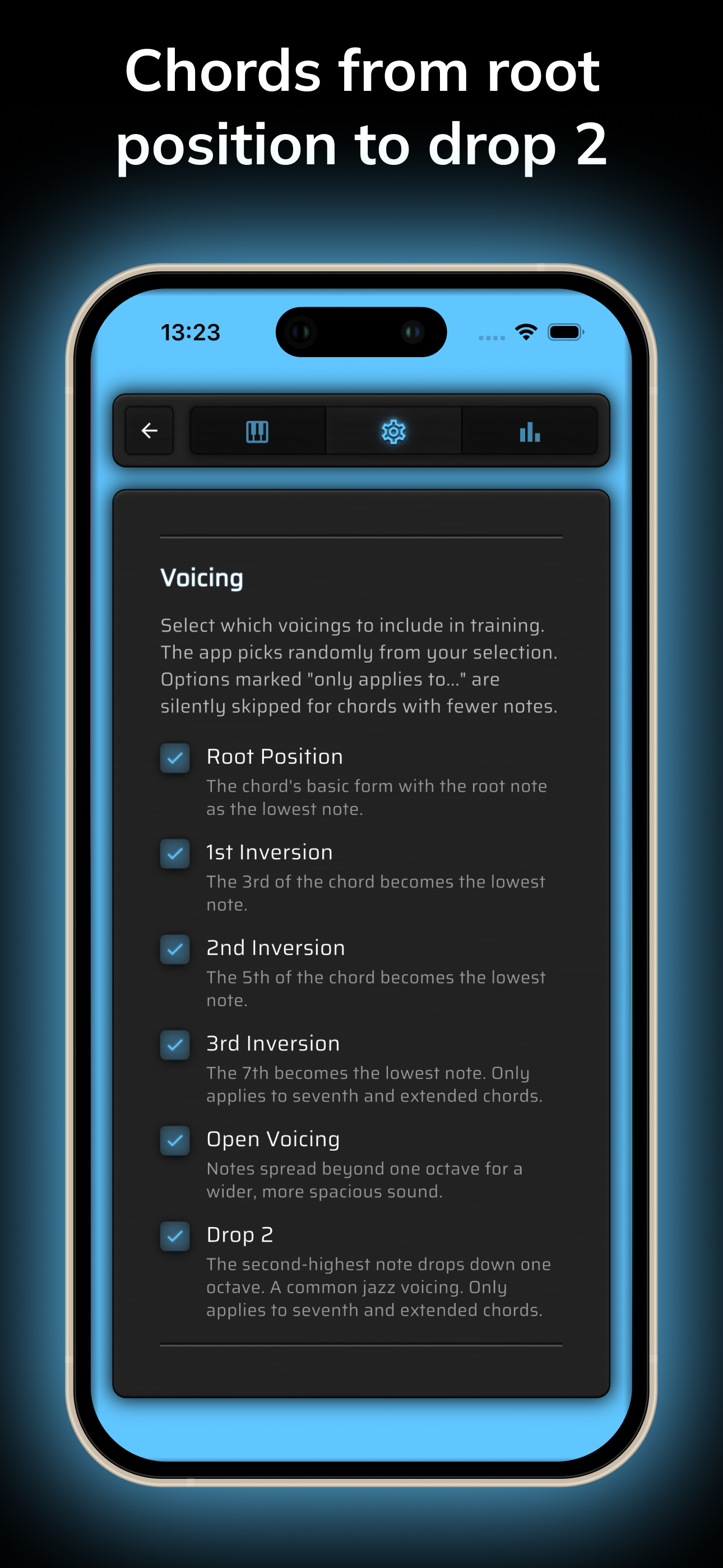
– 39 chord types — triads, seventh chords, extended chords, altered dominants — across root position, first through third inversions, open voicing and Drop 2 (200+ unique variations)
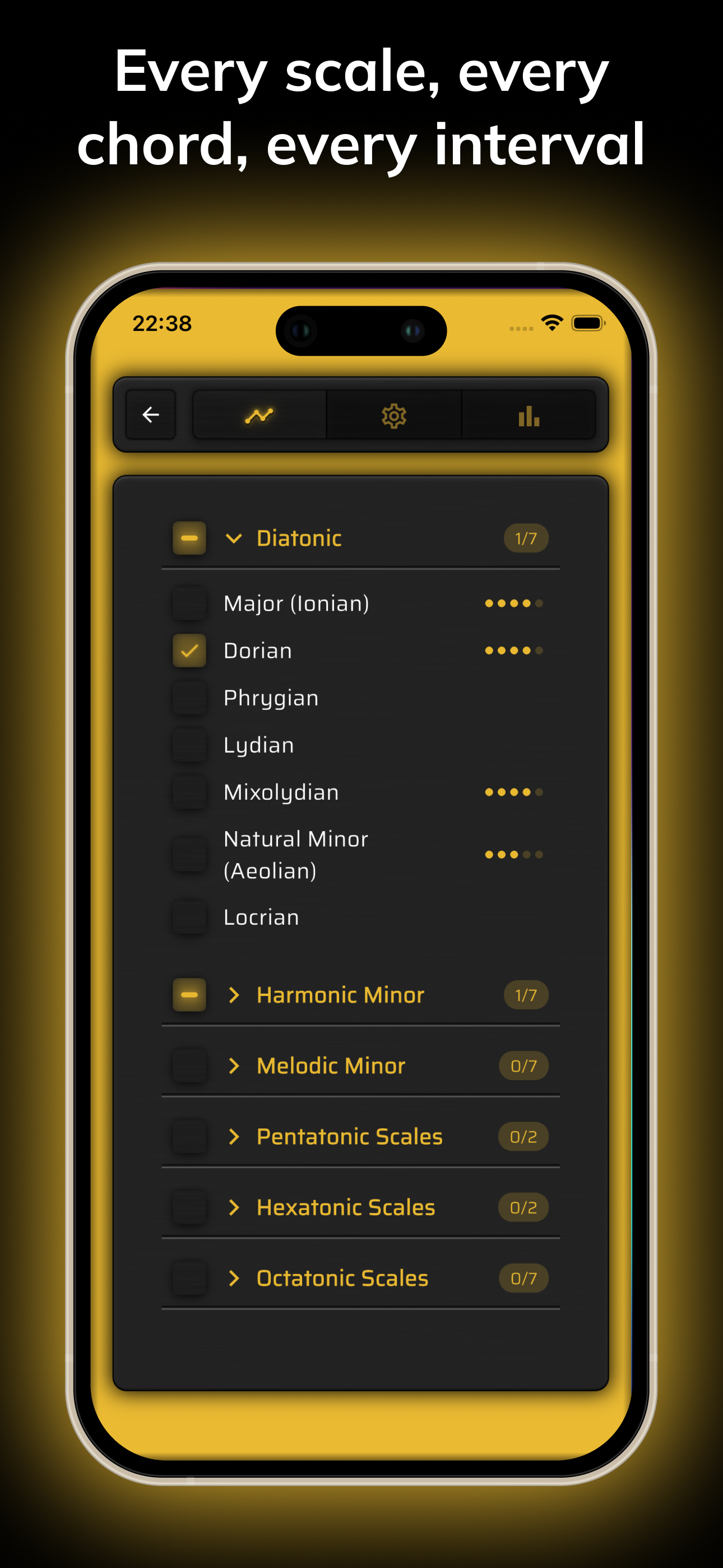
– 32 scales across six families — diatonic modes, harmonic minor modes, melodic minor modes, plus pentatonic, hexatonic and octatonic (whole tone, diminished, bebop included)
– Melodic dictation on melodies of 3 to 11 notes, diatonic or chromatic, three difficulty levels, optional chord backing
From your first major scale to your last bebop mode, in one app.
CONFIGURE EVERY DETAIL
Adjust tempo, playback direction, voicing, inversion, play style, difficulty, melody length, octave range and harmonic backing. Pick exactly which intervals, chords or scales each session contains. The app adapts to your level — you don't have to grind through someone else's curriculum.
KEEP TRACK OF YOUR PROGRESS
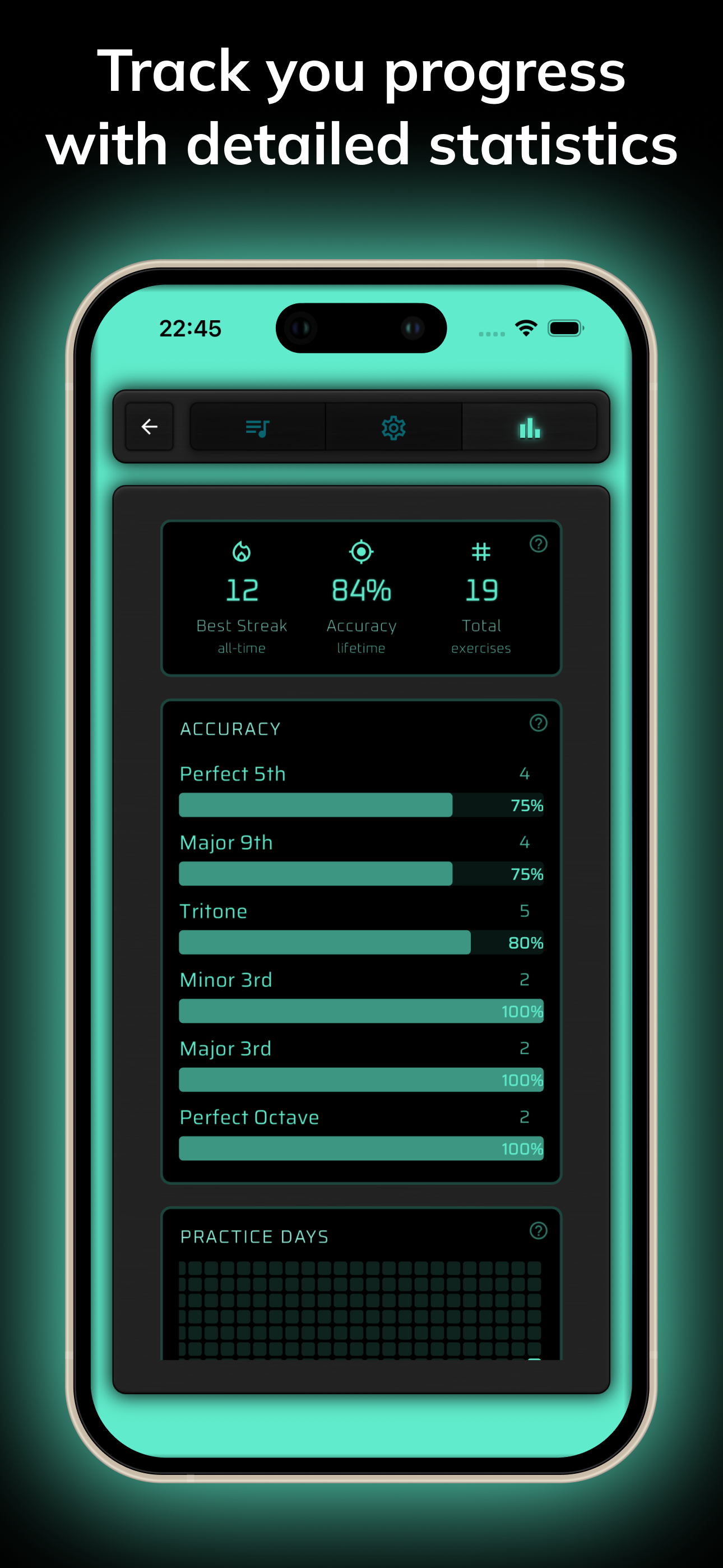
Per-element accuracy bars sorted weakest-first show you at a glance which intervals, chords or scales need attention. A 52-week heatmap tracks your practice days, and session records keep your best streak, lifetime accuracy and total exercises. Honest progress data — no badges, no fake levels.
A DARK, PROFESSIONAL INTERFACE
No ads. No distractions. No sign-in. The keyboard is fast, the typography is clean, and nothing gets between you and the next exercise.
GET STARTED
Free to download, with three days of full access. Then unlock the entire library forever with a one-time Lifetime purchase.
Open-source acknowledgements: good-ear.app/acknowledgements
Terms of Use (EULA): https://www.apple.com/legal/internet-services/itunes/dev/stdeula/
Privacy Policy: https://good-ear.app/privacy/
Most ear-training apps are multiple-choice quizzes. You hear something, you tap a label. You get good at recognising labels.
Good Ear is built for the other half of the skill. You hear an interval, a chord or a melody — in real harmonic context, with the home chord ringing under it — and you play it back on a real piano keyboard. The same skill you use when you transcribe a solo, sing a part you've never seen, or hear a chord change for the first time.
WHO ACTUALLY USES GOOD EAR
– Self-taught musicians who've hit the plateau where their ears can't keep up with their playing
– College and conservatory students preparing for aural-skills, theory or entrance exams
– Jazz players, producers and session musicians who transcribe by ear
– Vocalists and instrumentalists learning to sing and play what they hear
– Teachers and educators looking for a structured aural-skills tool
THREE THINGS GOOD EAR DOES THAT MOST EAR TRAINERS DON'T
1. PLAY IT BACK ON A REAL KEYBOARD
A scrollable 88-key piano with an overview bar, touch highlighting and multi-touch — the same input method a musician would use at an instrument. Multiple-choice mode is there too if you want fast recognition drills, and you can switch between them at any time. But Melodies mode is keyboard-input only, exactly like dictation in an aural-skills class.
2. HEAR IT IN REAL HARMONIC CONTEXT
Add a backing chord to interval and melody exercises. The three chord tones light up on the keyboard so you can see the tonal centre you are hearing — and tap them to explore the harmony without affecting your answer. Functional hearing, not abstract pitch detection.
3. DEPTH YOU WILL NOT OUTGROW
No "complete level 1 to unlock level 2." You pick exactly what you train, and the material goes deeper than most ear trainers ever bother:
– 24 intervals, from unison to compound 14ths
– 39 chord types — triads, seventh chords, extended chords, altered dominants — across root position, first through third inversions, open voicing and Drop 2 (200+ unique variations)
– 32 scales across six families — diatonic modes, harmonic minor modes, melodic minor modes, plus pentatonic, hexatonic and octatonic (whole tone, diminished, bebop included)
– Melodic dictation on melodies of 3 to 11 notes, diatonic or chromatic, three difficulty levels, optional chord backing
From your first major scale to your last bebop mode, in one app.
CONFIGURE EVERY DETAIL
Adjust tempo, playback direction, voicing, inversion, play style, difficulty, melody length, octave range and harmonic backing. Pick exactly which intervals, chords or scales each session contains. The app adapts to your level — you don't have to grind through someone else's curriculum.
KEEP TRACK OF YOUR PROGRESS
Per-element accuracy bars sorted weakest-first show you at a glance which intervals, chords or scales need attention. A 52-week heatmap tracks your practice days, and session records keep your best streak, lifetime accuracy and total exercises. Honest progress data — no badges, no fake levels.
A DARK, PROFESSIONAL INTERFACE
No ads. No distractions. No sign-in. The keyboard is fast, the typography is clean, and nothing gets between you and the next exercise.
GET STARTED
Free to download, with three days of full access. Then unlock the entire library forever with a one-time Lifetime purchase.
Open-source acknowledgements: good-ear.app/acknowledgements
Terms of Use (EULA): https://www.apple.com/legal/internet-services/itunes/dev/stdeula/
Privacy Policy: https://good-ear.app/privacy/
第一时间掌握精选限免应用/游戏信息
自定义喜欢的应用/游戏的价格变动
了解内购应用/游戏的限免或降价活动
查看应用/游戏价格历史等待合适时机再出手
第一时间收到价格通知不错过省钱机会

扫码下载 Follow
 番茄坐姿
番茄坐姿
「番茄坐姿」配合耳机来监控坐姿情况的番茄钟 APP,轻盈的界面,让番茄工作法发挥最大效果,详细也整洁...

 Bookord
欢迎使用 Bookord。Bookord 是一款专为热爱阅读的人士设计的应用程序,旨在帮助用户记录每...
 iPlayer
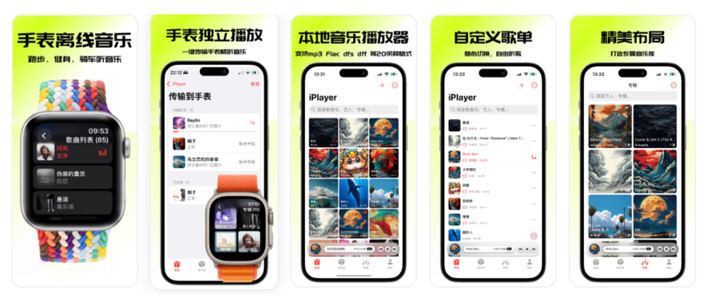
iPlayer 是一款强大的本地音乐播放器,兼容 iPhone、iPad 和 Mac,提供跨平台无缝...
 40
40


「番茄坐姿」配合耳机来监控坐姿情况的番茄钟 APP,轻盈的界面,让番茄工作法发挥最大效果,详细也整洁...
3

欢迎使用 Bookord。Bookord 是一款专为热爱阅读的人士设计的应用程序,旨在帮助用户记录每...
62

iPlayer 是一款强大的本地音乐播放器,兼容 iPhone、iPad 和 Mac,提供跨平台无缝...
天天发现优质应用
 到主屏幕
到主屏幕


产品名
这项是必须填的哦~可用平台
产品链接
这项是必须填的哦~产品一句话介绍
这项是必须填的哦~开发者邮箱
你也可以发送更多的产品故事到 hi@mergeek.com
我们会让你的产品被更多用户看到!
产品名
这项是必须填的哦~可用平台
产品链接
这项是必须填的哦~产品一句话介绍
这项是必须填的哦~开发者邮箱
你也可以发送更多的产品故事到 hi@mergeek.com
我们会让你的产品被更多用户看到!
已经成功发送到你的邮箱了,请注意查收
你成为这个产品的发现者啦,说说你的推荐语吧!