



 FlowDown - Open & Fast AI





App Introduction
App 介绍
 4.3
4.3
FlowDown is a fast, minimal AI chat app that makes working with large language models feel smooth, focused, and under your control.
For guides, tips, and advanced setup help, visit flowdown.ai.
Why FlowDown
Lightweight and efficient
Focus on your conversation, not the app. FlowDown launches quickly, stays out of your way, and keeps long chats responsive, even on busy machines.
Rich formatting with Markdown
Get clear, readable answers. FlowDown renders Markdown beautifully, so code blocks, bullet lists, tables, and headings in AI responses are easy to scan and use.
Works with the tools you already have
Connect to any OpenAI-compatible API, from major cloud providers to services running in your own home lab. If it speaks the OpenAI API, FlowDown can talk to it.
Talk with text, images, and audio
Show, not just tell. Paste screenshots, drop in images, or record your voice to ask questions. Use it to:
- Transcribe meetings or lectures
- Summarize voice notes
- Ask about the content inside a photo
Smooth, instant-feeling conversations
Blazing-fast text rendering makes responses stream in fluidly, so you can start reading and refining your prompt without waiting for the model to finish.
Automatic chat titles
Stop hunting for the right thread. FlowDown names your conversations automatically based on their content, so you can quickly find that "API bug fix" or "Trip planning" chat later.
Shortcut integrations
Use FlowDown inside your workflows. With Shortcuts support, you can:
- Send selected text from another app to your model
- Generate drafts, summaries, or replies with one tap
- Build custom automations that call your favourite model
Privacy by design
Your data is yours. FlowDown does not collect your chats. For maximum confidentiality, you can run models locally on your own machine with no external server involved.
Open source and transparent
Every line of code is available on GitHub. Inspect it, audit it, or adapt it for your own setups. You can see exactly how your AI client works.
Free trial and open code
FlowDown is fully open source, and we provide a free trial so you can confirm it fits your workflow before buying.
Source code and trial builds are available at:
https://github.com/Lakr233/FlowDown
To try it, open the Releases section and download the latest trial version.
Local models
For offline, private usage, FlowDown can run models locally on Apple Silicon devices with sufficient memory.
Supported model families include:
Cohere, Gemma, Gemma2, Gemma3, InternLM2, Llama / Mistral, OpenELM, Phi, Phi3, PhiMoE, Qwen2, Qwen3, Starcoder2, MiMo, and GLM4.
This gives you:
- Full control over your data
- No dependency on external servers
- The ability to experiment with different open models
Remote models
A complimentary remote model is included so you can start chatting immediately. This starter service is best-effort, with rate limits and no uptime guarantee.
For consistent, reliable use, we recommend:
- Bringing your own API, or
- Hosting your own inference server on local or home-lab hardware
FlowDown supports all OpenAI-compatible endpoints, making it ideal for connecting to tools like Ollama and LM Studio running on your own machine for maximum privacy.
Some setups require technical knowledge. If you are new to self-hosted AI or custom endpoints, please read our documentation carefully; the app can be challenging without it.
We strongly recommend using the free trial before purchasing, as refunds may not be available. For advanced or enterprise use, configuration examples and best practices are documented on our website.
Important note
AI-generated content can be inaccurate or misleading. Always verify critical information and use FlowDown responsibly; you are responsible for how you use the output.
© 2025 FlowDown Team. All rights reserved.
FlowDown is a fast, minimal AI chat app that makes working with large language models feel smooth, focused, and under your control.
For guides, tips, and advanced setup help, visit flowdown.ai.
Why FlowDown
Lightweight and efficient
Focus on your conversation, not the app. FlowDown launches quickly, stays out of your way, and keeps long chats responsive, even on busy machines.
Rich formatting with Markdown
Get clear, readable answers. FlowDown renders Markdown beautifully, so code blocks, bullet lists, tables, and headings in AI responses are easy to scan and use.
Works with the tools you already have
Connect to any OpenAI-compatible API, from major cloud providers to services running in your own home lab. If it speaks the OpenAI API, FlowDown can talk to it.
Talk with text, images, and audio
Show, not just tell. Paste screenshots, drop in images, or record your voice to ask questions. Use it to:
- Transcribe meetings or lectures
- Summarize voice notes
- Ask about the content inside a photo
Smooth, instant-feeling conversations
Blazing-fast text rendering makes responses stream in fluidly, so you can start reading and refining your prompt without waiting for the model to finish.
Automatic chat titles
Stop hunting for the right thread. FlowDown names your conversations automatically based on their content, so you can quickly find that "API bug fix" or "Trip planning" chat later.
Shortcut integrations
Use FlowDown inside your workflows. With Shortcuts support, you can:
- Send selected text from another app to your model
- Generate drafts, summaries, or replies with one tap
- Build custom automations that call your favourite model
Privacy by design
Your data is yours. FlowDown does not collect your chats. For maximum confidentiality, you can run models locally on your own machine with no external server involved.
Open source and transparent
Every line of code is available on GitHub. Inspect it, audit it, or adapt it for your own setups. You can see exactly how your AI client works.
Free trial and open code
FlowDown is fully open source, and we provide a free trial so you can confirm it fits your workflow before buying.
Source code and trial builds are available at:
https://github.com/Lakr233/FlowDown
To try it, open the Releases section and download the latest trial version.
Local models
For offline, private usage, FlowDown can run models locally on Apple Silicon devices with sufficient memory.
Supported model families include:
Cohere, Gemma, Gemma2, Gemma3, InternLM2, Llama / Mistral, OpenELM, Phi, Phi3, PhiMoE, Qwen2, Qwen3, Starcoder2, MiMo, and GLM4.
This gives you:
- Full control over your data
- No dependency on external servers
- The ability to experiment with different open models
Remote models
A complimentary remote model is included so you can start chatting immediately. This starter service is best-effort, with rate limits and no uptime guarantee.
For consistent, reliable use, we recommend:
- Bringing your own API, or
- Hosting your own inference server on local or home-lab hardware
FlowDown supports all OpenAI-compatible endpoints, making it ideal for connecting to tools like Ollama and LM Studio running on your own machine for maximum privacy.
Some setups require technical knowledge. If you are new to self-hosted AI or custom endpoints, please read our documentation carefully; the app can be challenging without it.
We strongly recommend using the free trial before purchasing, as refunds may not be available. For advanced or enterprise use, configuration examples and best practices are documented on our website.
Important note
AI-generated content can be inaccurate or misleading. Always verify critical information and use FlowDown responsibly; you are responsible for how you use the output.
© 2025 FlowDown Team. All rights reserved.

第一时间掌握精选限免应用/游戏信息
自定义喜欢的应用/游戏的价格变动
了解内购应用/游戏的限免或降价活动
查看应用/游戏价格历史等待合适时机再出手
第一时间收到价格通知不错过省钱机会


扫码下载 Follow
更多极客玩法


 保险箱私密相册
一款管理私密重要信息的App,用于隐藏手机相册、密码本、联系人及文件系统,提供双层加密空间。应用程序...

 实时海拔计
实时海拔计
实时海拔计,专为户外爱好者与旅行打卡者打造。超大字号实时海拔、GPS 经纬度、气压与指南针数据一屏呈...
 Follow - 产品限免情报
「Follow」是一款专业的产品限免情报追踪应用。添加你喜欢的应用或游戏,让「Follow」帮你追踪...
Geek Stories
极客玩法
更多极客玩法
Selected Solutions
精选产品
 24
24
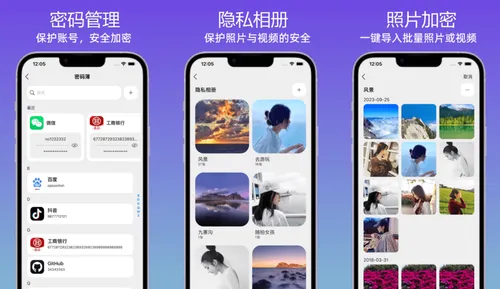

一款管理私密重要信息的App,用于隐藏手机相册、密码本、联系人及文件系统,提供双层加密空间。应用程序...
6


实时海拔计,专为户外爱好者与旅行打卡者打造。超大字号实时海拔、GPS 经纬度、气压与指南针数据一屏呈...
311

「Follow」是一款专业的产品限免情报追踪应用。添加你喜欢的应用或游戏,让「Follow」帮你追踪...
天天发现优质应用
 到主屏幕
到主屏幕






你成为这个产品的发现者啦,说说你的推荐语吧!